

Backup & Restore
ExtensionsAssignments Manager
Backup & Restore
How to backup policy assignments before migration and restore them if needed using the Assignment Manager.
Before making any assignment changes, Assignment Manager provides a built-in backup system to ensure you can always restore to the previous state if needed.
Safety first approach
The backup feature creates a complete snapshot of your current assignment state before any migration begins.
Start the Backup Process
Before any migration, click the "Backup Ready Policies" button in the Assignment Manager interface.
This backs up ALL policies in your tenant
The backup process will:
Export all policy assignments
Include assignment filters and targeting
Package everything into a downloadable ZIP file
Download & Store the Backup
Once the backup completes, download the ZIP file to a secure location.
Recommended naming convention:
policy-backups_tenantID_-YYYY-MM-DD-HHMMSS.zip
Example: intune-backup-2024-01-15-143022.zipImportant
Store backups in a version-controlled location or secure file share. You may need them weeks or months later.
The backup ZIP contains JSON files for each policy with complete assignment information. After extracting the ZIP, you'll see a folder structure like this:
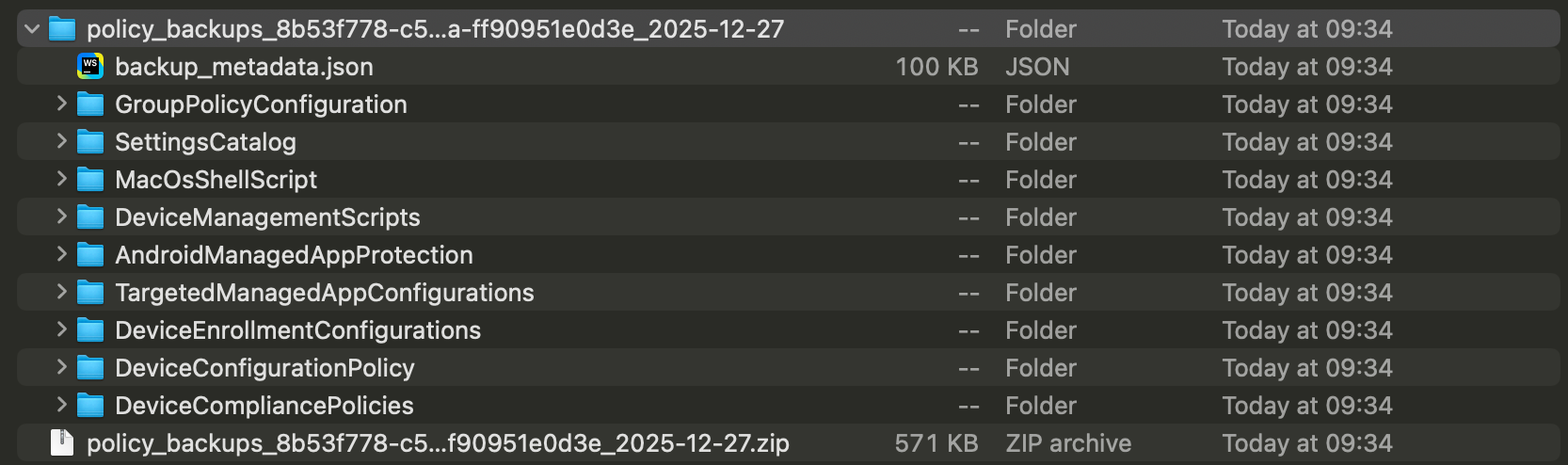
Each JSON file contains:
Policy metadata and settings
All current group assignments
Applied filters (include/exclude)
Assignment targeting details
Access the Microsoft Intune Portal
Currently, restoration must be done through the Microsoft Intune admin center:
Navigate to the appropriate policy section
Locate the policy you want to restore assignments for
Why manual restoration?
Direct restoration through Assignment Manager is planned for future releases. Manual import ensures you have full control over what gets restored.
The exported policies are raw JSON data directly from Intune, making it easy to re-import. Be aware that when uploading the JSON file to the Intune Portal will create a new policy with a new policy ID. That means you have to remove the old policy after the new one is created.
Coming soon
We are currently working on a direct restore functionality to avoid this extra step in the future.
Before every migration:
Always create a fresh backup using the backup button
Store in a secure, accessible location
Document your restore process:
Which policies were changed
What the previous state looked like
Who can perform emergency restores
How to validate successful restoration
Test your backups:
Periodically validate backup file integrity
Practice restoration procedures in test environments
Ensure team members know the restoration process
Backup takes too long:
Large tenants may require 10+ minutes
Don't close the browser during backup
Consider backing up policy types separately
Backup file is empty or corrupt:
Check browser download settings
Verify sufficient permissions in Intune. Check the permissions documentation.
Try again during low-usage periods
Can't find the right policy in backup:
Search by display name in the JSON files
Check policy type folders carefully
Use the policy GUID if display names changed
Assignments don't match after restore:
Verify group names haven't changed
Check if filters still exist with same names
Confirm you have the right backup version
Coming soon
Direct restore functionality - Import backup files directly through Assignment Manager without manual portal work.
Selective restore - Choose specific assignments to restore rather than full policy restoration.
Automated validation - Automatic comparison between backup and current state.
CSV Format Reference
Scenarios\ \ Bulk manage Microsoft Intune policy assignments using CSV files (add, remove, replace) across tenants. Multi-Tenant Overview\ \ How Intune Assistant supports MSPs with GDAP-enabled multi-tenant management